
This is a college essay that explains how to implement HubSpot into a small company. This takes a look at a small financial outsourcing company that needs to get the attention of other larger companies. Their goal is to grow and make profit from a small company with forty employees. This can give you a great idea on how this tool works and how to start using it.
Link to HubSpot CRM: https://www.hubspot.com/
Summary
HubSpot is considered to be the best choice for a marketing COTS solution for this company to market themselves to larger companies. The goal here is for this company to market themselves to larger companies because their main service is providing financial help and services to these larger companies. A Customer Relationship Management platform, or CRM, is the best tool for marketing a company. HubSpot is also the cheapest and most effective product that this company can implement. It can be described better here: “The HubSpot for Startups Program has been created to provide tools and support to the founders of promising small businesses so that they can ace their marketing and sales efforts. With benefits like discounts on software tools, community mentorship, startup onboarding, and exclusive training, it is, by far, one of the best programs for startups. It starts small but grows along with your company.” (Grazziti, 2025). It is important to understand how to implement HubSpot into this small firm. Most employees work from home, and they will need to access it remotely to communicate with customers and complete other required tasks related to their job.
For a start, is it best to begin with the free version of HubSpot and upgrade in the future. This is because the company needs a good budget strategy to grow their company. They will need to begin making money from HubSpot free with their current customers and use the money made to grow the platform. Reinvesting profits is a great way to grow from small to large in the future. However, in the beginning stages of implementation, the company needs to create several accounts, reach out to potential clients, make websites, and start advertising. They will also need to look at security implementations, training new and current employees, and the future of the platform. There are several features that will need to be maintained by employees that have experience in software engineering. This is for things like custom website creation. This is something that is more in the future of the platform though, as this small company needs to make a profit off HubSpot before spending money on new employees.
This is the beginning phase of implementation. When they begin to add either new or current employees, they will have to upgrade to the starter plan, which is around fifteen dollars a month. This is so every employee can be added to the platform and begin training. Every employee will need to access this platform every day of employment.
HubSpot is a great tool for employees because it is one of the best ways to effectively communicate with customers, track interactions like phone calls and emails, and keep these customers coming back for financial services. It is best to start by marketing to small companies and eventually creating advertisements that market these financial services to any company. Before HubSpot can be implemented though, there are some hardware and software requirements the company needs to meet.
HubSpot System Documentation
Hardware Requirements
Firstly, they need to have the most modern computer hardware available. This mainly includes laptops that run Windows 11 operating systems, have modern central processing units (CPUs) and at least 16gb of random-access memory (DDR4 or DDR5), and with solid-state drive storage equivalent to 500gb or more. The reason this is important is because remote employees need fast and reliable laptops to complete their work properly. Windows is required over other operating systems because of user-friendliness compared to MacOS and Linux, their office tools, and price. Good laptops can be described better here: “Well, manufacturers design these laptops to handle the challenges of a busy work life, whether you’re traveling, working from home, or in the office. They have good battery life, are easy to carry around, have advanced security features, and include helpful software for fleet management.” (Amanda, February 12, 2024). HPs are a great choice, and they are affordable. Older hardware will work, but with new technology being implemented into HubSpot like AI tools, modern hardware is the best thing to use. Employees also need to have the required peripherals that are compatible with these laptops. Most laptops have a built-in microphone and webcam, and this is important when purchasing laptops for the company. However, reliable headsets are an important peripheral to buy. This makes communication easier when talking to customers and contacts in HubSpot. Other recommendations are mainly for the employees. They should have a smartphone to enable two-factor authentication and a reliable internet connection with fast speeds.
It is also recommended that the company has some of its own desktop computers in their main office. They should have similar hardware requirements of the laptops with more storage than the laptops. They also need to have a faster internet connection. There are also software requirements for these laptops before HubSpot can be implemented.
Software Requirements
It is important for these laptops to have proper communication software, security, and workspace tools. For a startup company, they should have tools like Slack or Microsoft Teams for communication, VPNs for security, and free or paid software packages like Google Workspace or Microsoft Office. All the software provided to employees needs to come through an application known as “Software Center”. This is described better here: Your organization’s IT admin uses Software Center to install applications, software updates, and upgrade Windows. This user guide explains the functionality of Software Center for users of the computer. Software Center is installed automatically on Windows devices that your IT organization manages.” (Microsoft, October 18, 2025). The guide explains that software needs to be installed through the software center for the safety of the organization. Employees that use a computer should not be allowed to install applications directly from any website. It is an important requirement for all the laptops to have for remote workers.
Admin Implementations
The hardware and software requirements are the first steps. These need to be implemented before HubSpot itself can be used. The first step for implementing HubSpot is to create an Admin user, or a main account that stores all the necessary information for the platform. This has been explained in the design requirements: L09 – Design Requirements Group 4.docx. Once an account is created, current employees need to be invited to the program to access it. This is for developers and customer service employees. Then current customers should be added into HubSpot so the company can organize their clients and get started on getting new companies to work with.

Key Steps to Follow:
- When an account is created, the home page should look like this.
- Continue to follow the section of “setting up the basics”.
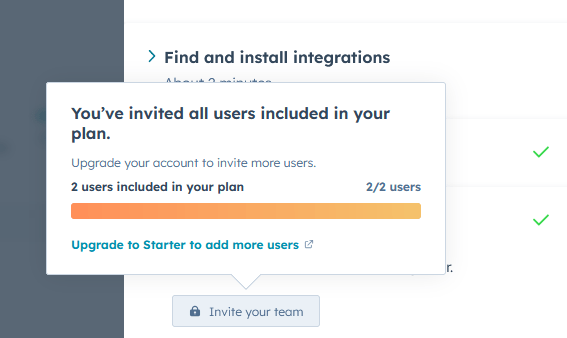
The starter plan is required to invite more employees and may be required to begin marketing. The administrator should be the first to access the platform, and then the upgrade is required.
Contacts and Companies
It is important to use these features to keep track of the people on the platform. Contacts are better explained here: “Any person who interacts with your business can be saved as a contact in HubSpot. Examples of contacts include visitors that convert on a form, visitors who contact your chat team, or potential customers that your team met during an event. You can create individual contacts from the contacts index page or create contacts through other HubSpot tools.” (HubSpot, April 10, 2024). To start with the Contacts and Companies feature, the firm will first import all existing clients into HubSpot using CSV files or integrating with current systems like QuickBooks or Excel spreadsheets. Following this upload, internal staff will collaborate with either outsourced CRM specialists or virtual assistants to clean and organize these records. Custom properties will be set up to indicate financial services, client tiers, and communication preferences. External customer service teams shall be provided limited access via HubSpot’s user roles and permissions to view and update contact records while maintaining security. In-house as well as outsourced customer interactions will all be logged in the system so that a full history of communication is maintained.
Website Creation
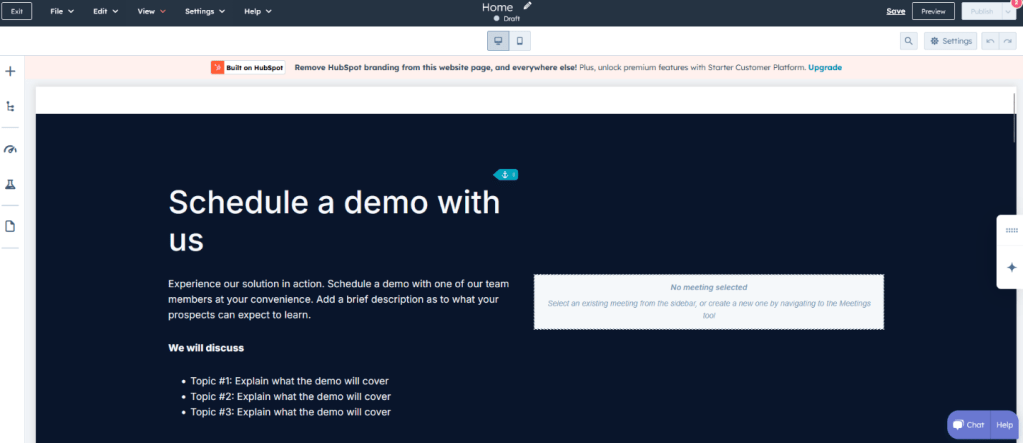
Another essential feature is the website creation tool. HubSpot offers easy-to-use templates and customization options to build a modern and responsive website. For this small firm and for any company, a website is one of the most important marketing tools to use. The website should include basic pages such as About, Services, Contact, and a blog section for posting regular financial advice and updates. As the firm grows, more advanced features like client portals or integrated booking systems can be added. First, a developer or employee familiar with web design can use HubSpot’s drag-and-drop features to get a basic version of the site running quickly and affordably.
- Example of drag and drop features with HubSpot website creation.
Advertisements
HubSpot also provides tools for managing advertisements across social media platforms and search engines. These tools can help this firm launch paid marketing campaigns that target specific audiences, such as decision makers at mid-sized to large businesses. Hubspot tracks the performance of these ads and provides analytics that can be used to refine future marketing strategies. A small initial advertising budget can be used to test which messages and platforms work best, and then the firm can reinvest in what yields results. Email marketing campaigns should also be set up through HubSpot, offering newsletters, financial tips, or promotional services to contacts in the system.
Products
Even though this firm provides financial services, the “Products” section of Hubspot can be repurposed to catalog the different service packages it offers. These might include accounting consultations, tax filing support, investment planning, or business budgeting packages. Having these organized as products allows the sales team to easily quote services, track what’s most in demand, and manage customer interests through deals. These “products” can be listed with pricing tiers and descriptions, and employees can generate service quotes or proposals directly from the system.
The Future of HubSpot
As this firm grows, HubSpot’s capabilities will grow with it. Eventually, the company can start using more advanced CRM features like automated workflows, lead scoring, and AI-powered sales assistance. The marketing team may begin integrating content campaigns, webinars, and SEO strategies directly through HubSpot. The platform’s analytics tools can also be used to generate detailed reports that help leadership make better business decisions. HubSpot also allows third-party integrations with tools like QuickBooks, Zoom, and DocuSign, which are useful as the firm takes on more clients and automates parts of its business. It is important for the company to buy
Upgrades
Finally, upgrading HubSpot will be an important part of future growth. The free version is a great starting point, but once the firm starts generating revenue and seeing results, it will be worth investing in HubSpot’s premium features. These upgrades will allow for more automation, larger contact lists, advanced reporting, and additional support. Choosing the right plan will depend on business needs, but the key is to upgrade gradually and strategically, using profits to fund growth. This ensures that the firm gets the most out of every feature while maintaining financial stability.
Employee Training Process
Required Individual Training
Employee training is essential before using HubSpot. An employee must be ready to use the platform when they talk to their manager. They need to confidently and efficiently use the platform depending on their responsibility to the company. The employees that use this platform are:
- Sales Representatives
- Customer Service Representative
- Marketing Specialists
- Managers
- Admins
Optional Employees
- Software engineers
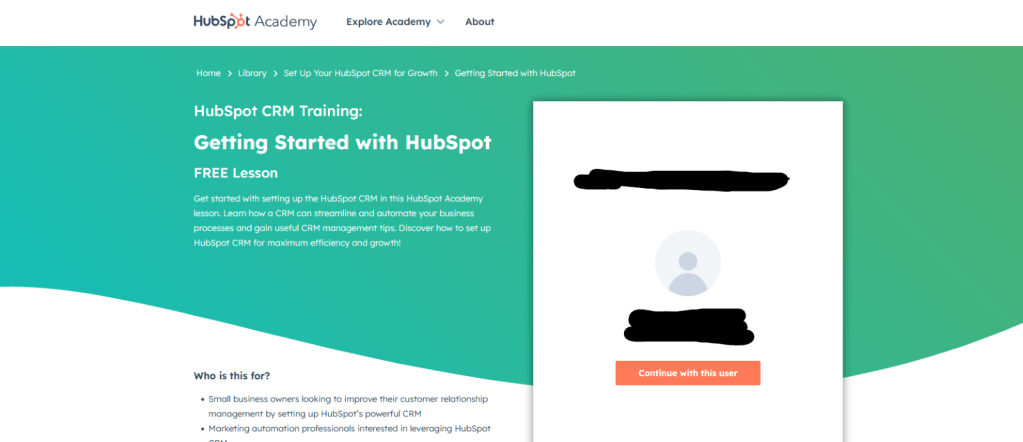
All employees will receive an email to create an account on the platform which is sent by the administrators. They can start using HubSpot when clicking the link in the message. All training is required at HubSpot academy, and this can depend on the years of experience an employee has with the platform.

Required Training:
Sales Representative:
- CRM Basics
- Task and Meeting Schedule
- Sales Pipeline Management
Customer Service Representatives:
- Ticketing System Overview
- Knowledge Base Management
- Customer Service Conversations and Resolutions
Marketing Specialists:
- Email Campaigns
- Website Landing Page and Form Creation
Managers:
- Ticket Monitoring and Team Pipeline
- Forecasting and Goal Setting
- Dashboard and Reporting Basics
Admins:
- Custom Properties and Pipeline Setup
- Workflow Automation Setup
- User Management and Permissions
Software Engineers (Optional):
- Custom Integration and Sync Processes
- HubSpot Developer Documentation Review
- HubSpot APIs and Webhooks Overview
All required training can be found at HubSpot Academy. It can be assigned by a manager or searched for and added to an account. This link is here: https://academy.hubspot.com/
Optional Training
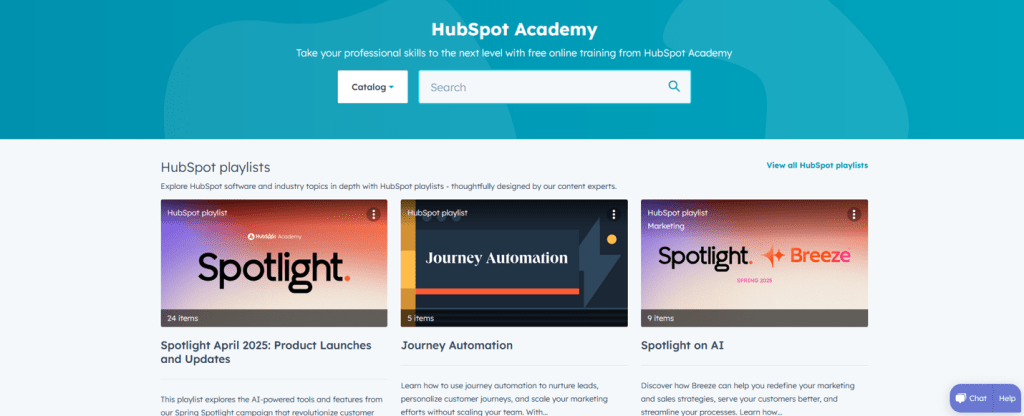
It is important to understand that after the required training is complete, they still need to continue to learn how to use the platform. After an employee sign up for an account with HubSpot and receives permission to access the company’s platform, they must use their account to complete the training. Employees are encouraged to learn about the platform through HubSpot Academy, where all the required training is located. Employees should do this training in their down time at work or sometimes at home (if they want to). Extra required training can be assigned by an employee’s manager to help them with problems at work.
- The home page is displayed below. Employees are encouraged to sign up for optional training to continue their learning and development.
Employee Restrictions
There are several rules that need to be followed when accessing HubSpot from home. Employees may be required to come into the office or meet on a communication application like Microsoft Teams to explain their work or fix issues with their laptop. These rules are to be followed though when employees work from home and have no issues:
- Website restrictions are in place, and employees must only access websites related to work. Using the laptop for games, restricted video websites, illegal material, or inappropriate content is never allowed.
- The employee agrees that their manager is allowed to monitor their activity on the laptop. Their manager must allow the employee to complete their work and respect some privacy.
- A VPN is required when working from home. It always needs to be used for accessing the internet on the laptop. It is essential for accessing HubSpot.
 Niche Tech Space
Leave a comment