
When picking out a gaming monitor—or even just a good all-around monitor for everyday tasks—a 144Hz monitor is still one of the best choices in 2025. It hits that sweet spot between performance and price. Compared to higher-end gaming monitors like 240Hz or 360Hz models, a 144Hz monitor is a more affordable option that can still make your entire setup look sharp and run smooth.
So, what does 144Hz actually mean? A 144Hz monitor refreshes the image on the screen 144 times per second. That’s more than double what you get with a standard 60Hz monitor. The jump from 60Hz to 144Hz is a huge improvement—you can actually see and feel the difference. The mouse cursor moves more fluidly, windows drag across the screen more smoothly, and animations or in-game actions feel more responsive. Whether you’re browsing the web or playing games, everything just feels faster.
Why Choose a 144Hz Monitor?
The biggest reason to go with a 144Hz monitor is the value. You get much better visual performance without spending a fortune. In 2025, you can find quality 144Hz monitors for as low as $130 to $180, depending on the brand and size. They’re perfect for gamers who want a smooth experience on a budget, and they also work great in office setups or home studios where fluid visuals and low input lag matter. For casual and even semi-competitive gamers, 144Hz is more than enough.
What Are the System Requirements for a 144Hz Monitor?
To take full advantage of a 144Hz monitor, your system needs to be able to output at that frame rate. For non-gaming tasks like work, web browsing, or media playback, just about any modern PC or laptop from the last five years can support 144Hz, as long as your GPU and monitor are connected with a DisplayPort or HDMI 2.0 cable.
For gaming, though, it’s a little more demanding. You’ll want at least a mid-range graphics card. A solid setup in 2025 would include something like an NVIDIA GTX 1660 Super, RTX 2060, or any of the newer 30 or 40 series cards (like the RTX 3060 or 4060). AMD alternatives like the RX 6600 or newer are also good options. On the CPU side, an Intel i5 or i7 (10th-gen or newer) or a Ryzen 5/7 (3000 series or newer) will do the trick.
Also, since these systems can generate a fair amount of heat—especially when gaming—it’s smart to have proper airflow and cooling in your case. That’s especially true if you’re running higher-end GPUs that are pushing 144+ frames per second in modern games.
If you’re building or upgrading your system for 144Hz gaming, check out the linked article on budget and high-end gaming desktop builds below. It has all the latest recommendations for 2025.
Why Choose Amazon?
Amazon is still one of the most convenient and reliable places to shop for monitors. With fast shipping, tons of user reviews, and a solid return policy, it’s an easy way to compare different 144Hz models and grab the one that fits your needs. As of 2025, Amazon is valued at over $1.5 trillion and continues to be one of the most trusted platforms for buying expensive tech like monitors, graphics cards, and full PCs.
Below is a list of some of the best 144Hz monitors you can get right now. They’ve been selected based on real-world value, build quality, and performance—perfect for gamers or anyone looking to upgrade their screen experience without overspending.
Acer KG241Q Pbiip 23.6″ Full HD (1920 x 1080) TN 144Hz 1ms Monitor with AMD FreeSync Technology (Display Port & 2 x HDMI)
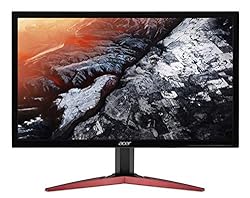
Comes With:
- 1920 x 1080p Screen
- 144Hz Monitor
- 1ms GtG
- DisplayPort and HDMI Support
- FreeSync
- 23.6 Inch Monitor
ASUS VP249QGR 23.8” Gaming Monitor 144Hz Full HD (1920 x 1080) IPS 1ms FreeSync Extreme Low Motion Blur Eye Care DisplayPort HDMI VGA,BLACK

Comes With:
- 1920 x 1080p Screen
- 144Hz Monitor
- 1ms GtG
- DisplayPort, VGA and HDMI Support
- FreeSync
- 23.8 Inch Monitor
- Low Motion Blur
MSI 24″ FHD 1500R Curvature Non-Glare Super Narrow Bezel 1ms 1920 x 1080 144Hz Refresh Rate Tilt Adjustment FreeSync Curved Gaming Monitor (Optix G24C4), Black

Comes With:
- 1920 x 1080p Screen
- 144Hz Monitor
- 1ms GtG
- DisplayPort, VGA and HDMI Support
- FreeSync
- 23.8 Inch Monitor
- Low Motion Blur
ASUS TUF Gaming 27” 1080P Monitor (VG279Q1R) – Full HD, IPS, 144Hz, 1ms, Extreme Low Motion Blur, Speaker, FreeSync Premium, Shadow Boost, VESA Mountable, DisplayPort, HDMI, Tilt Adjustable
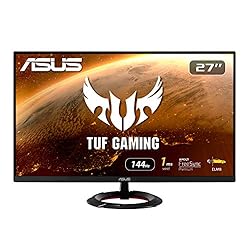
Comes With:
- 1920 x 1080p Screen
- 144Hz Monitor
- 1ms GtG
- DisplayPort, HDMI Support
- FreeSync
- 23.8 Inch Monitor
- Low Motion Blur
Conclusion
A 144Hz monitor is still good today, and it continues to be one of the most practical and popular options for gamers, students, and everyday users alike. In fact, this refresh rate has become so common that it’s now even found on many newer smartphones and tablets. That’s because 144Hz delivers a noticeable boost in smoothness and responsiveness, whether you’re gaming, scrolling through websites, or just navigating your desktop.
Compared to a standard 60Hz display, the difference is like night and day—movements feel more fluid, animations are crisper, and the entire experience becomes more visually satisfying. You don’t need a top-of-the-line setup to enjoy it either. A decent mid-range PC can take full advantage of a 144Hz monitor, making it a great option for anyone who wants better performance without the premium price tag.
If you’re not ready to invest in a 240Hz or 360Hz display, or you just want a monitor that strikes the right balance between price and performance, 144Hz is more than enough. It’s future-proof for most tasks, versatile across work and play, and still holds its own even as higher refresh rate displays become more common.
Whether you’re building a new PC, upgrading your current setup, or just looking for a smoother experience on a budget, a 144Hz monitor is a smart and reliable choice for 2025 and beyond.
 Niche Tech Space
Leave a comment